Upload an invoice. Start reviewing in minutes.
An AI-native platform, not a legacy tool with AI bolted on. AI parses your invoices, drafts your guideline clauses, extracts rules from uploaded documents, and generates firm-specific guidelines letters. 50+ pre-built review checks and real-time spend intelligence, built from the ground up.
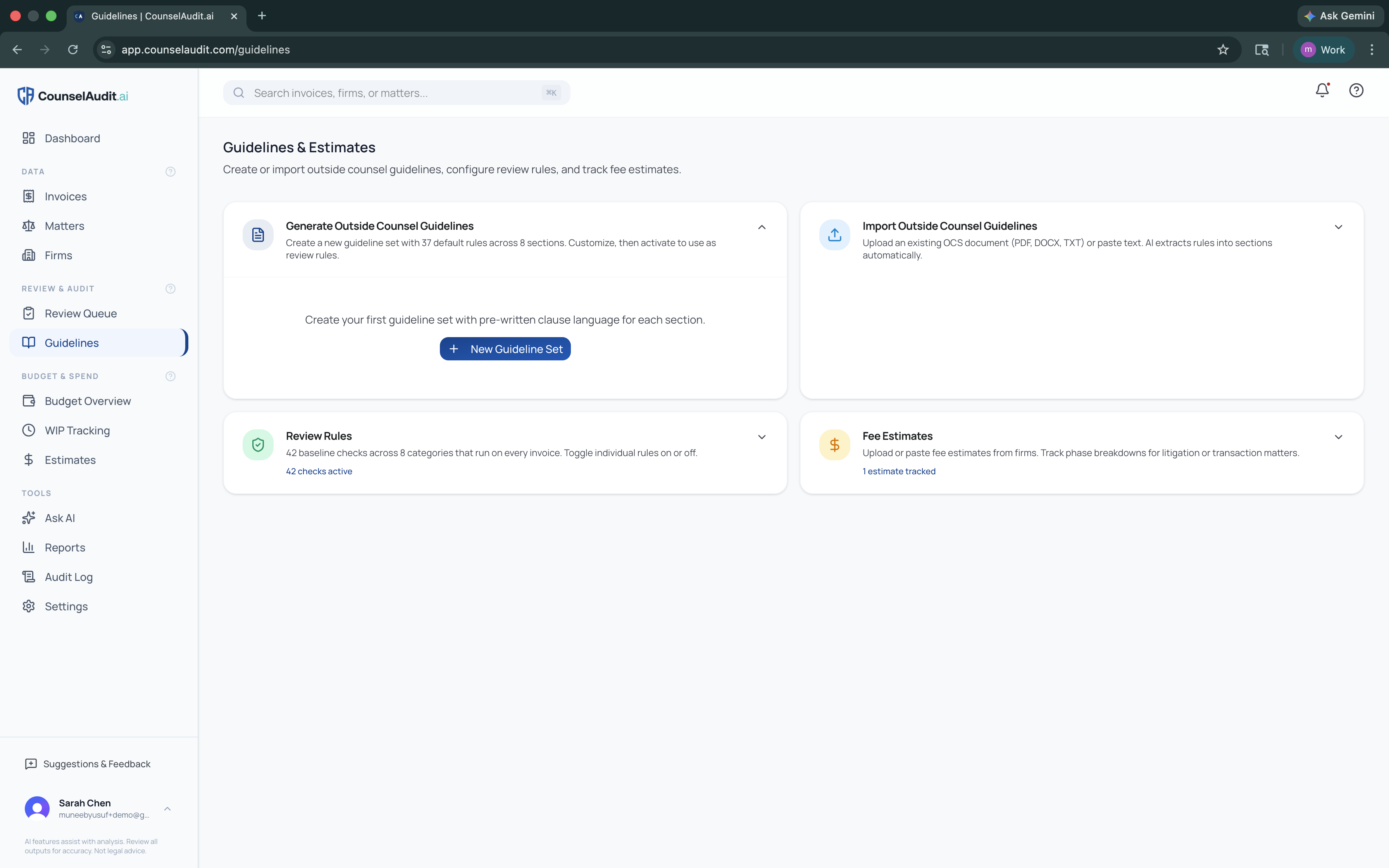
Your Guidelines & Estimates Hub
Four tools that work together. Build your guidelines, configure your checks, track your estimates, and review every invoice against them automatically.
Generate Outside Counsel Guidelines
Start with 53 default rules across 9 sections. Toggle rules on or off, edit clause language, adjust severity. Use AI to draft improved clauses. Activate when ready.
Sections
Import Existing Guidelines
Already have an OCG document? Upload your PDF, DOCX, or TXT file. AI extracts and categorizes your rules into sections automatically. Review, edit, and activate.
Supported Formats
50+ Pre-Built Review Checks
50+ checks run on every invoice, with or without guidelines. 30 are on by default. Each one carries a badge that says how it is enforced: 38 are exact logic with no AI, 3 are logic first and then AI-verified to cut false positives, 3 are AI judgment calls you switch on, and 1 checks the timekeepers against your approved roster. Toggle each on or off, tune the thresholds.
Categories
Staffing & Supervision (8) · Legal Fees (15) · Expenses & Disbursements (6) · Travel (4) · Billing Requirements (8) · AI & Technology (1) · Effort & Scope Review (3)
Fee Estimates & Tracking
Upload fee estimates from outside counsel. Break down by litigation phase or transaction element. Track actual spend against estimates throughout the matter lifecycle.
Phase Types
7 litigation phase presets · 6 transaction element presets · Custom breakdowns
AI Invoice Review
Upload & Parse
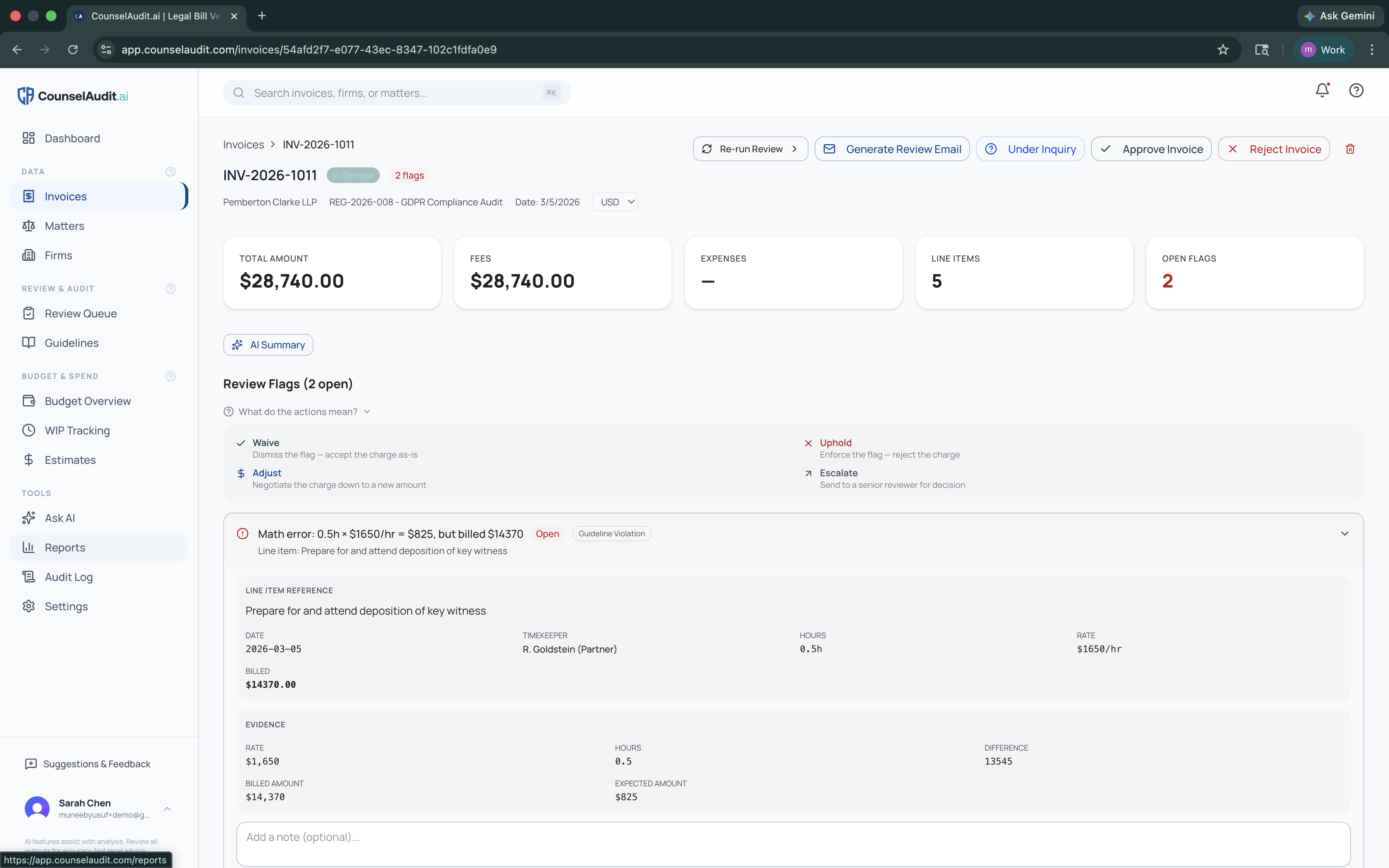
Drag and drop PDF or LEDES invoices. AI extracts every line item, timekeeper, date, amount, and task code. Firms and matters are auto-detected.
Automatic Flagging
Your 50+ review checks run instantly. Each billing issue is flagged with the specific rule it violated and a severity level. No manual scanning required.
Accept, Dispute, or Compromise
For each flag, Accept the charge, Dispute it, or Compromise on a new amount. Grouped flags take Accept all, Dispute all or Compromise all, and one click settles a whole class, like cutting an internal call to the lead attendee. Every card shows who decided it and when, and every action is in the audit trail.
Review Emails
After review, generate a professional email summarizing all flagged items, actions taken, and adjustment amounts. Ask a colleague to check it before it goes, without handing over the step. Copy and send to outside counsel.
Works the Way Your Team Already Works
Every invoice follows one clear track, from intake to paid: Intake, Review, Pushback, Firm, Approve for payment, Paid. Pushback and Firm drop out when nothing is disputed, and there are no routes to set up. A solo GC can run it alone on day one; a team can hand each step to a different person, ask a colleague to check a letter, or jump back a step when a firm pushes back. Move an invoice to any stage, reopen Review after the letter went out, undo an approval or a paid mark, or park a bill under inquiry while you wait on the firm. When a firm reissues a bill, link it as a revision: your decisions carry forward line by line, a What changed band shows the diff, and the original drops out of spend. Nothing to configure first, and every move lands in the invoice's History.
Tightens When You Need It To
When you need more control, switch it on: a per-person Can approve for payment switch, an approval limit per person per currency, and a Reviewers can't approve their own bills switch for the organization. If someone can't approve, the app names who can and routes it to them. In-app reminders surface firms that have not replied in 30 days and invoices left under inquiry; reminder emails are opt-in. Implementation is included and complete in hours: we set it up with you to match your approval policy, load your guidelines, and set your budgets.
Guidelines Letter
Dear Blake & Associates,
Please find enclosed the updated Outside Counsel Guidelines for all matters handled on behalf of [Organization]. These guidelines are effective immediately and supersede any prior...
[ 38 of 53 rules selected ]
Guidelines Letters
AI-Generated, Firm-Specific
Select a recipient firm and choose which of your 37 guidelines to include. Pick a tone, Formal, Collaborative, or Strict, and add any special instructions.
Professional & Ready to Send
AI generates a professional guidelines letter. Copy to clipboard or download as a text file. Send to outside counsel to set expectations from day one.
Budget & Spend Intelligence
Budget Overview
Track approved budgets, invoiced amounts, each firm's latest WIP, and projected spend per matter, and set budgets above the matter too: a quarter or fiscal year, for all spend, one matter type, a cost center or a GL account. Color-coded alerts when budgets approach or exceed their limit, red above 100%, amber at 80%, green below.
Fixed Fees, Caps & Blended Rates
Record the fee arrangement you agreed with a firm and every invoice is checked against it, with budgets and arrangements tracked side by side. See how alternative fee arrangements work.
WIP Collection & Accrual Reports
Ask firms for their unbilled work on a schedule, preview every request before it goes, and report accruals as of any month end. See how WIP and accruals work.
Fee Estimates vs. Actuals
Upload fee estimates from outside counsel. Break down by 7 litigation phases or 6 transaction elements. Track actual spend against estimates throughout the matter lifecycle. Spot scope creep before it becomes a problem.
Budget Overview
Invoice NW-1042 · Series C Financing
Fixed fee in effect: USD 150,000
Hourly checks were not run on this invoice. Math, expense, late billing and discount checks ran as usual.
Run hourly checks anywayBilled past the fixed fee
ErrorFees billed to date: $158,400 against a fixed fee of $150,000. Overage: $8,400.
Reduce to agreed feeAFA Performance
Billed vs agreed
106%
Effective rate
$412/hr
vs rate card
$61K saved
Alternative Fee Arrangements
Fixed Fees, Caps & Blended Rates
Record a fixed fee, a fee cap or a blended rate on one matter, or for a firm across all its matters. A matter's arrangement takes priority over the firm's. Invoices are matched by the dates of the work, not the invoice date, so June work billed in July still falls under June's arrangement.
The Right Checks for the Deal
On a fixed fee, the hours don't change what you owe, so hourly checks like rate creep, block billing, vague descriptions and excessive hours are switched off. Math, expense, late billing and discount checks still run. The invoice names the arrangement, says how many checks were not run, and lets you re-run with all of them. Capped matters keep every hourly check. On a blended rate, each timekeeper's billed rate is compared with the agreed rate.
Overages Flagged and Settled
When fees billed to date go past the fixed fee or cap, one flag states the overage. Capped matters also warn as they approach the cap (at 80% by default). The overage leads the review letter to the firm, and the settlement proposal offers it as the reduction.
Set Up from the Engagement Letter
When an engagement letter or fee estimate describes a fixed fee, cap or blended rate, CounselAudit offers to create the arrangement with the details filled in. Nothing is saved until a person checks it and confirms.
AFA Performance Report
Reports shows how each arrangement is working: fees billed against the agreed amount, the effective hourly rate where the firm reported hours, and the difference from what the firm's rate card would have charged. Each currency is reported on its own.
WIP & Accrual Reports
Part of the Professional plan, and of the free trial.
Requests on a Schedule, Reviewed Before Sending
Work in progress requests go to the right firms on the right matters: the matter's own setting first, then the WIP clause in your outside counsel guidelines, then a default of the 5th day after month end. Quiet matters are left out. Every run is a draft a person previews and sends, and unattended sending is available once a run has been reviewed.
Firms Answer Without an Account
Firms reply through a short form that needs no login, or by replying to the request email. An emailed reply waits for a person on your team to confirm the figures before they count.
Reminders and Overdue Alerts
Late firms get reminders, by default 3 and 10 days after the due date, sent automatically or drafted for a person to send. Anything still outstanding shows as overdue on the dashboard and in notifications, with an optional digest email.
Month-End Accrual Report
As of a month end you pick: unbilled fees and disbursements by firm and matter, by cost center and GL account, one block per currency. When the invoice for that work arrives, the accrual shows as reversed with the variance. A firm that has not reported repeats its last figure, marked as carried forward, or counts as zero or blank, as you choose. Rejected invoices and reductions recorded as an approved amount show as still unbilled. Each firm's median miss against its later invoices is tracked.
An Estimate When a Firm Stays Silent
When a firm does not report, CounselAudit can offer a run-rate estimate from that matter's last 3, 6 or 12 months of invoices, shown as a range and labelled as an estimate. Nothing is recorded until a person accepts it.
Coverage, Aging and Trend
See which firms reported, how old the unbilled work is, and a 12-month trend of reported WIP against invoiced spend. Every view exports to CSV for your close, and Ask AI answers WIP questions in plain English. Nothing is posted to an ERP or general ledger, and currencies are never converted.
Accruals as of Sep 30, 2026 · USD
Harper v. Meridian Corp
Reported by the firm · Litigation / GL 6400
$24,300
Series C Financing
Carried forward from Aug 31, 2026
$18,000
IP Portfolio Review
Estimated by CounselAudit, firm did not report
$9,750
Reversed in September
Accrued
$31,200
Invoiced
$33,950
Variance
+$2,750
AI Usage billing guidelines, built in.
CounselAudit.ai is the first platform with dedicated AI & Technology billing checks. Five rules covering disclosure requirements, no AI learning curve billing, human review mandates, and more. Address the newest category of billing abuse before it becomes a problem.
Disclosure Required
Firms must disclose when AI tools are used in billable work
No AI Learning Curve
Zero tolerance for billing time spent learning AI tools
Human Review Required
All AI-generated work product must have human oversight
Ask AI
"What's our total spend with Blake & Associates this year?"
Your total spend with Blake & Associates in 2026 is $347,250 across 4 matters.
Based on 23 approved invoices. Largest matter: Harper v. Meridian ($186,000).
Ask AI
Natural Language Spend Queries
Type a question about your legal spend in plain English. Ask AI converts it to a database query, runs it against your data, and returns a plain-English answer with supporting details.
No Reports to Build
Skip the dashboard filters. Just ask: "Compare Q1 vs Q2 litigation spend" or "Which firms have the highest flag rates?" Instant answers, no configuration.
Use CounselAudit from Claude / ChatGPT (MCP connector)
The optional MCP connector brings the full review workflow into your AI assistant: find and audit invoices, decide flags, approve or reject, assign a reviewer, draft the letter to the firm, manage budgets and fee arrangements, and ask spend questions from the chat. Learn about the MCP connector.
Dashboard & Reporting
Executive Dashboard
Total Spend, Pending Review, Savings Found, and Guideline Compliance at a glance. Spend by Firm and Spend by Matter charts with All Time, YTD, and Last 3 Month views.
Invoice Queue Stats
Queue Total, High Severity flags, and Compliance percentage. See the health of your invoice pipeline instantly.
Reports & Export
Generate reports across firms, matters, and timekeepers. Export to CSV. Full audit log of every action for compliance and oversight.
Firm Scorecards
Track guideline compliance rates per firm. Recognize top performers and flag outliers for follow-up conversations.
Executive Dashboard
$1.2M
Total Spend YTD
$168K
Savings Found
12
Pending Review
87%
Compliance
Top Firms by Compliance
Invoice Email Intake
Every organization gets a private intake address. Firms send invoices to it, or you cc it, and they arrive parsed under Arrived by email. A person confirms each one before it is reviewed, so nothing gets flagged against the wrong matter.
Up and running in minutes
14-day free trial. No credit card at signup. A 10-step guided tour walks you through everything on your first login.
Sign Up
Create your org. First user becomes admin automatically.
Set Up Guidelines
Generate from scratch or import your existing OCG document.
Upload Invoices
Drop a PDF or LEDES file. AI parses and flags issues instantly.
Review & Act
Accept, Dispute, or Compromise every flagged item, then approve for payment.
Track & Optimize
Monitor budgets, collect WIP for month-end accruals, ask AI about your spend, and export reports.
See it in action.
Upload your first invoice and start reviewing in under 5 minutes, no sales process required. Or we set it up with you: implementation is included, complete in hours, with no implementation fees.